
Payment Gateways We Support
Connect 10+ payment gateways: credit cards, PayPal, crypto, bank wire, Zelle, and more.
InvoiceLaunch integrates with multiple payment gateways so you can choose the processor that works best for your business. Your clients can pay via credit card, PayPal, and other methods depending on which gateways you configure.
Supported Payment Gateways
- Stripe: Credit & debit cards, Apple Pay, Google Pay. Ideal for most businesses with global reach.
- PayPal: PayPal balance, credit cards, Pay Later options. Great for customers who prefer PayPal checkout.
- Square: Credit & debit cards. Popular choice for businesses already using Square POS.
- Authorize.Net: Credit & debit cards, eChecks. Established gateway trusted by enterprises.
- Braintree: Credit & debit cards, PayPal, Venmo, Apple Pay, Google Pay. Owned by PayPal with robust fraud protection.
- Adyen: Cards and many local payment methods. Built for enterprises operating across multiple countries.
- Razorpay: Credit & debit cards, UPI, NetBanking, wallets. Primary gateway for businesses in India.
- Mollie: Cards and popular European payment methods like iDEAL and Bancontact. Great for businesses across Europe.
- Flutterwave: Cards, mobile money, and bank transfers across Africa and other regions.
- Coinbase Commerce: Cryptocurrency payments including Bitcoin, Ethereum, Litecoin, and USDC.
- Bank Wire Transfer: Direct bank-to-bank transfers. Provide your bank details for clients to send payment manually.
- Zelle: Fast bank transfers using email or phone number. Popular for US-based instant payments.
How to Configure a Payment Gateway
- Open Payment Methods from the sidebar to view your Payment Gateways
- Click Add Gateway
- Select your preferred payment processor
- Enter your API credentials (from your gateway's dashboard) and click Configure
- Click Test Connection to verify the setup
- Set the gateway to Active
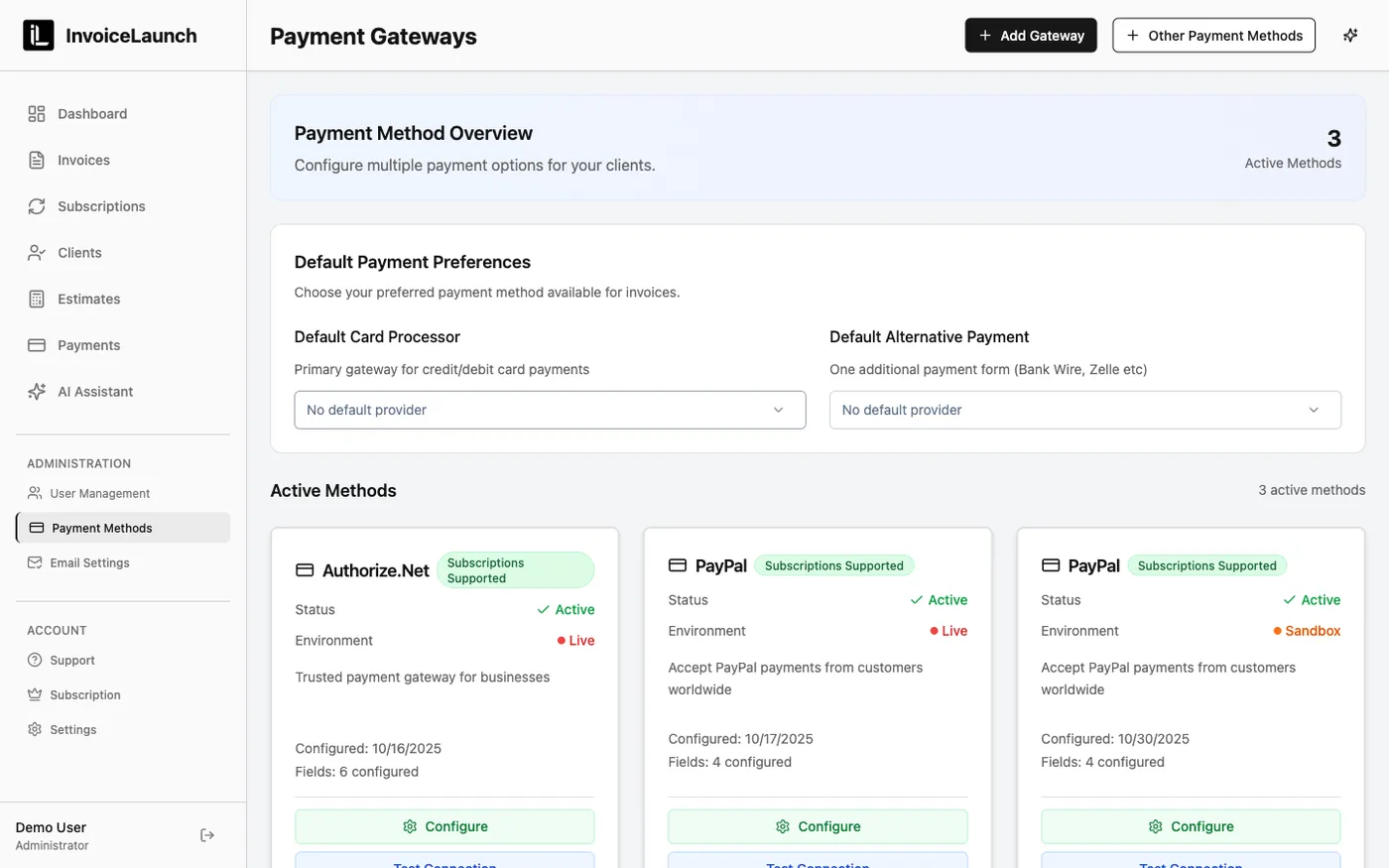
Once active, you can also choose a default card processor and an alternative payment method so the right options appear on every invoice.
Payment Processing Fees
Processing fees vary by gateway and are set by each payment processor, not InvoiceLaunch. Typical rates:
- Credit Cards: 2.4% – 2.9% + $0.30 per transaction
- PayPal: 2.9% + $0.30 per transaction
- ACH/eCheck: 0.8% – 1% (where supported)
Check your gateway's pricing page for exact rates.
When Clients Pay
- Client clicks "Pay Invoice" link in email or invoice PDF
- Secure payment page loads with your configured gateways
- Client selects a payment method and enters payment information
- Payment processes through your connected gateway
- Both you and the client receive confirmation emails
- Invoice status updates to "Paid" automatically
Multiple Gateways
You can configure multiple payment gateways and set a default. Your clients will see all active payment options when paying an invoice.
Security: All payment data is transmitted directly to your payment gateway using industry-standard encryption. InvoiceLaunch never stores full credit card numbers—your gateway handles all sensitive payment data securely.